
Building a desktop widget for KDE Plasma should feel creative and rewarding. You're crafting native desktop experiences that live directly on users' panels and desktops across millions of Linux machines.
Yet for years, the developer experience was notoriously fragmented. Documentation was scattered across legacy wikis. Scaffolding required stitching boilerplate together by hand. Even something as simple as adjusting 4 pixels of padding meant manually killing and restarting plasmoidviewer dozens of times an hour. Packaging, symlinking into KDE's system paths, and compiling gettext translation catalogs were entirely manual chores.
Prasmoid changes that. It is an all-in-one command-line toolkit written in Go that turns KDE Plasmoid development into a modern, frictionless workflow. Think of it as the Vite or Turbopack for the KDE desktop ecosystem.
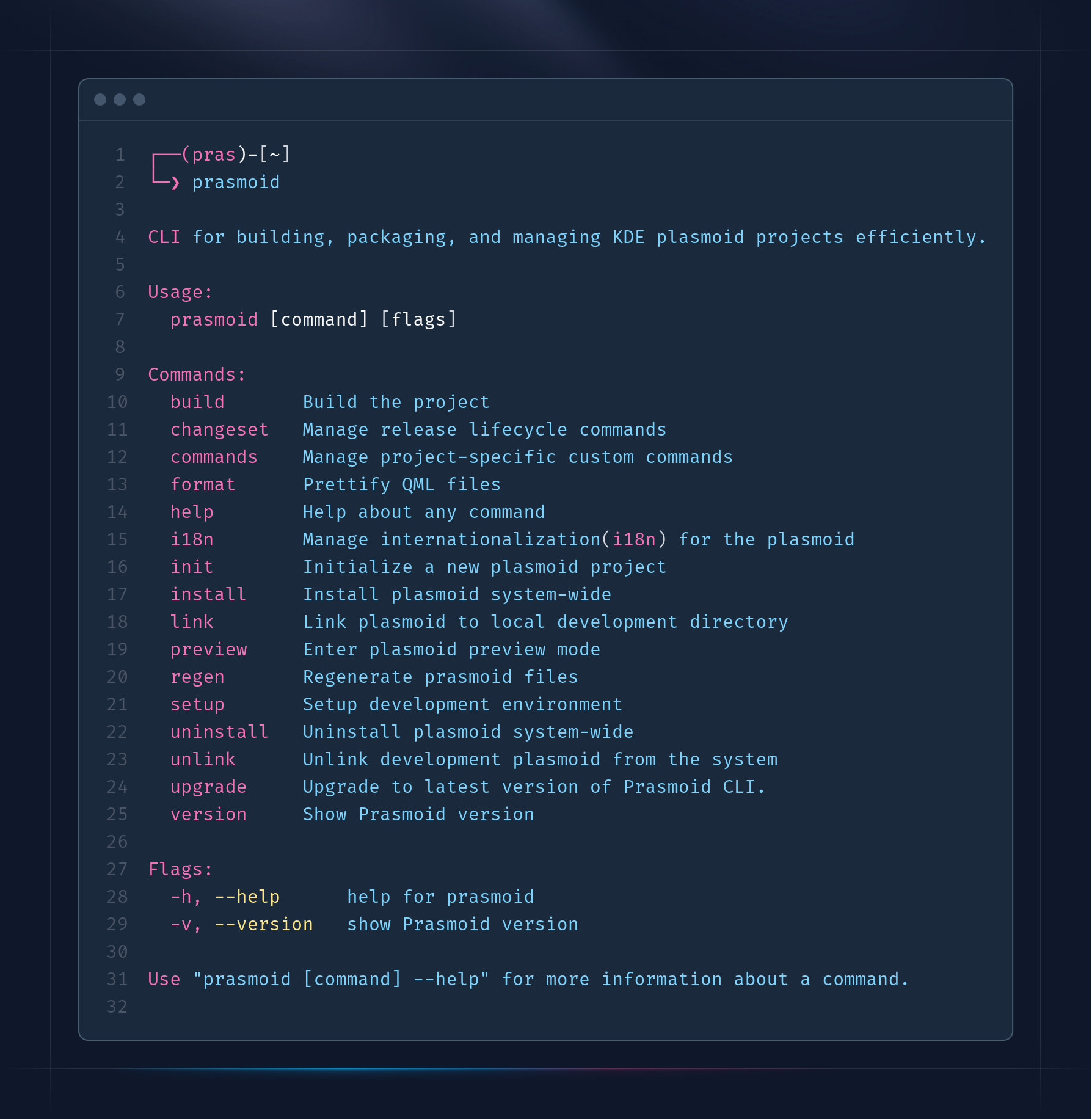
Why Prasmoid?
Prasmoid replaces fragile shell scripts and manual steps with a unified, developer-first toolchain engineered specifically for Qt/QML widgets.
Instant Scaffolding
CLIInteractive project wizard that sets up battle-tested metadata, QML directory structures, and configurations in under five seconds.
Hot-Reload Live Preview
DXLive preview window powered by plasmoidviewer that automatically watches your files and re-launches the instant you hit save.
Embedded JS Engine
ArchitectureWrite custom build and deploy commands using JavaScript with full TypeScript types—running natively inside Go with zero Node.js dependencies.
Automated Localization
i18nOne-command translation pipeline that handles string extraction (.pot), translation syncing (.po), and binary compilation (.mo) seamlessly.
Direct Desktop Symlinking
TestingInstantly mount or unmount your development widget directly into KDE Plasma's local registry for real desktop testing without manual copying.
Production Bundling
ReleaseCompile, format, and package your project into standard .plasmoid archives ready for direct installation or distribution on the KDE Store.
The Workflow Upgrade
Here is how development feels before and after introducing Prasmoid:
| Workflow Step | The Legacy Way | The Prasmoid Way |
|---|---|---|
| Project Setup | Manual directory creation, copying boilerplate metadata.json | prasmoid init with an interactive, validated wizard |
| UI Tweaking | Save file → switch terminal → kill viewer → restart viewer | prasmoid preview --watch with auto-restart on save |
| In-Desktop Testing | Manually copying directories to ~/.local/share/plasma/plasmoids | prasmoid link (and prasmoid unlink when done) |
| Code Formatting | Inconsistent styling or manual qmlformat invocations | prasmoid format --watch watches and tidies QML on the fly |
| Translations (i18n) | Tedious xgettext flags, manual directory setup, msgfmt steps | prasmoid i18n extract & prasmoid i18n compile |
| Extensibility | Messy bash glue scripts or heavy Node.js npm tooling | Lightweight JavaScript scripts executed via embedded Goja runtime |
The Development Lifecycle
Prasmoid accompanies you across the entire journey—from an empty folder to a published widget.
Generate a complete, standard-compliant Plasmoid project in seconds:
prasmoid init -n MyAwesomeWidgetPrasmoid prompts for your widget metadata (ID, version, description, author) and bootstraps a clean project layout:
Say goodbye to manual viewer restarts. Run the preview command with file watching enabled:
prasmoid preview --watchPrasmoid launches plasmoidviewer in an isolated test window. The moment you save any .qml, .js, or configuration file, the process automatically restarts and reloads your widget with zero downtime.
Need to keep your code pristine? Run the automatic formatter side-by-side:
prasmoid format --watchIsolated viewers are great, but widgets need to be tested inside real Plasma panels, system trays, and desktop grids.
Instead of manually copying build folders into system directories, use symlink management:
# Symlink project into ~/.local/share/plasma/plasmoids/
prasmoid link

# Clean up when testing finishes
prasmoid unlink
Your widget immediately shows up in KDE Plasma's "Add Widgets..." panel for real-world stress testing.
Localizing KDE applications used to mean remembering complex gettext command flags and folder structures. Prasmoid automates the whole pipeline:
# 1. Scan your QML files and extract translatable strings into .pot templates
prasmoid i18n extract

# 2. Compile translated .po files into optimized binary .mo catalogs
prasmoid i18n compile
Track version increments and changelog updates painlessly:
prasmoid changesetWhen your widget is ready for the world, compile and package it into a pristine .plasmoid archive:
prasmoid build --output ./distPrasmoid validates the directory structure, ignores dev-only artifacts, and compresses the project into a release-ready package ready for installation or uploading to store.kde.org.
Architectural Highlight: Scriptability Without Node.js
One of the proudest architectural decisions in Prasmoid is how custom tasks are handled.
Developers love the flexibility of JavaScript for writing project-specific workflows (such as deploying to a remote test machine, syncing assets, or triggering webhooks). However, requiring users to install Node.js, npm, and hundreds of megabytes of node_modules just to run a helper script defeats the purpose of a lightweight Go binary.
Embedded Runtime: Prasmoid embeds a pure ECMAScript 5.1+ JavaScript engine written in Go. You get full JavaScript scripting capabilities and rich TypeScript autocompletion (prasmoid.d.ts) natively, without needing Node.js or any external runtime installed on your system.
To generate a new custom command:
prasmoid command add -n deployThis creates .prasmoid/commands/deploy.js with complete typings and the built-in prasmoid API:
/// <reference path="../../prasmoid.d.ts" />
const prasmoid = require("prasmoid");
const { execSync } = require("child_process");
const path = require("path");

prasmoid.Command({
  short: "Builds and deploys the plasmoid to a remote test machine.",
  run: (ctx) => {
    console.green("🚀 Starting automated deployment...");

    // 1. Trigger internal build
    execSync("prasmoid build -o ./build");

    // 2. Extract metadata
    const id = prasmoid.getMetadata("Id");
    const version = prasmoid.getMetadata("Version");
    const packagePath = path.join("build", `${id}-${version}.plasmoid`);
    const remoteTarget = "deck@steamdeck.local:/home/deck/widgets/";

    // 3. Transfer package via scp
    console.log(`📦 Shipping ${packagePath} -> ${remoteTarget}`);
    execSync(`scp ${packagePath} ${remoteTarget}`);

    console.green("✨ Deployment completed successfully!");
  },
});
You can now run your custom command directly through the CLI:
prasmoid deployBuilt With & For the Community
Prasmoid began as a tool to solve my own development headaches, but the open-source community quickly took notice and helped elevate it:
- Cross-Distribution Packaging: Thanks to contributors like clorteau, Prasmoid is packaged and distributed across Arch Linux (AUR), Debian, and Fedora, making installation as simple as a single package manager command.
- Built-in Upgrades: With
prasmoid upgrade, users on direct binary installations can fetch the latest release with one keystroke. - Community-Driven Features: Features like the multi-locale i18n manager and automatic QML formatting were developed directly in response to feedback from real Plasmoid creators.
Prasmoid is 100% Free & Open Source. Star the repository, report an issue, or contribute to the project on GitHub.